
|
DebugBar Doc Tutorials Public |
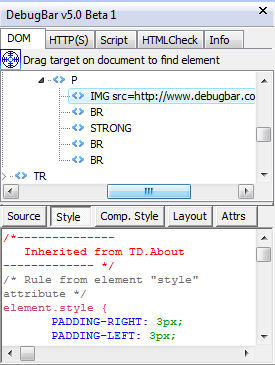 This tab display the HTML document tags tree (the DOM) in the "Document" root entry of the tree. The other tree root entries ("Link", "Images", "Forms", "Style sheets") give you faster access to useful inner document elements. By clicking on the right button over the DOM Tree, you open a menu which gives you the option to "Rebuild the DOM tree". This can be useulf when the web page is changed dynamically by scripts after download. When you select an HTML tag entry in the DOM tree, this element is "flashed" in the Web Page and the data corresponding to the button selected is displayed. There are 5 buttons :
Last but not least, a target |


 allow you to retrieve an element DIRECTLY in the Web Page ! : Click on the target and keep the left mouse button down, then navigate in the page and the HTML element behind the target will be flashed. When you release the button, the last selected element is selected in the DOM tree and all its attributes are displayed !