
|
DebugBar Doc Tutorials Public |
In this document you'll find detailed instructions on how to install and run Companion.JS. Companion.JSDownload and run the Companion.JS installer. A Microsoft Script Debugger EngineIn order to work, Companion.JS needs a Microsoft Script Debugger Engine.
If you don't one of those components installed, you can install the free Microsoft Script Debugger. It is free but cannot be redistributed, that's why it is not included in Companion.JS installer. Internet ExplorerYou'll need to tell Internet Explorer to enable the javascript debugger : 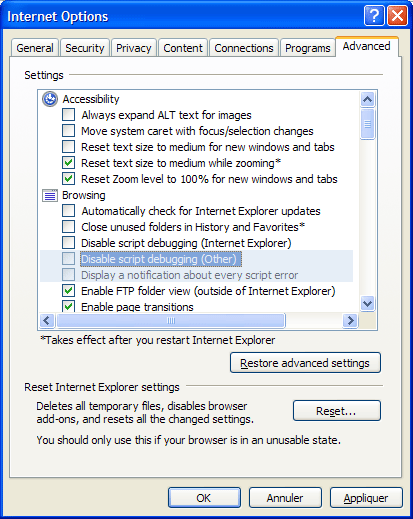 In Tools > Internet Options, select the Advanced tab and make sure to un-tick both check boxes:
You are set! You can check Companion.JS at work by visiting this dummy page. Trouble shootingInstallIf you want to make sure that CJS is properly installed go to Tools > Toolbars > Explorer Bar, Companion.JS should be there (and can be called from there as a matter of fact). 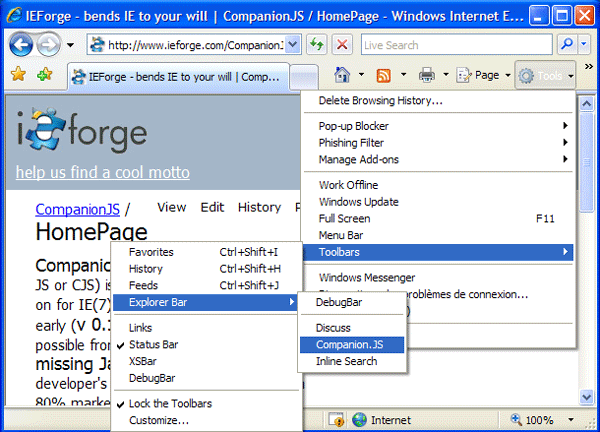 DebuggerIf Companion.JS is not working, you can check its status by going to the About Box. Then you can copy/paste the information text and ask for some help on the forum. 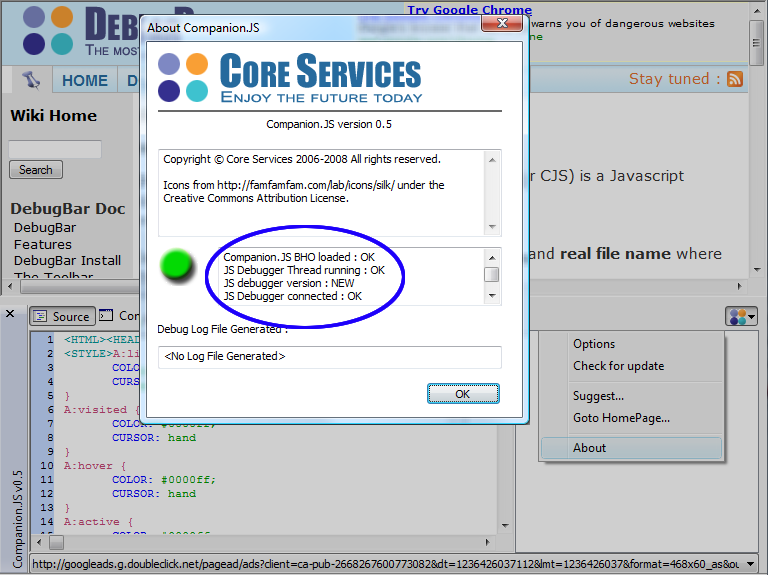 BHO not registeredIf the Companion.JS BHO is not registered (check this forum thread for more info), you can use this registry file to manually create the registry keys for the BHO. Don't forget to change the file path to the CompanionJS.dll in this file : The current value is |

